

People who want to play on a phone usually start with one question: is there something to download? A palazzobet download search tends to promise a store app, yet what can actually be confirmed is narrower. This page explains which mobile routes exist, which of them can be verified and how risky each one is. The mobile interface opens in the phone browser and needs no installation.
An official app in Google Play or the App Store is not confirmed, so no such claim is made here. Gambling can be addictive and is for adults aged 18 and over only; the advice below applies to personal devices, because installing unknown packages on shared or work phones can also break workplace rules.
Do You Need the Palazzobet App?
For most players a separate app is unnecessary. The wish for fast access is met by a home-screen shortcut that opens the site without the browser bar and updates itself. Installing a package makes sense only if a specific device feature is needed, and that need is rare. Anyone typing palazzobet app download is usually looking for convenience, not a file. Anyone searching palazzobet mobile information should start with the browser and add a shortcut only if it helps.
On Android, searches for palazzobet apk download return many files from unofficial sources. Each one has to be verified before it is installed, and verification means finding the address in an official announcement, not trusting a ranking. The phrase Palazzobet app often hides three different things: a store app, a home-screen shortcut or a package file, and the difference decides the risk. Palazzobet android phones open the site in the browser without trouble, though very old versions may limit some live streams.
They go stale quickly and are exactly what imitation sites copy. Each method below is ordered from safest to riskiest, and the first one, the browser, covers what most players need. A palazzobet casino app on an iPhone does not exist as a package, and palazzobet ios users get the same site in Safari.
Mobile Casino Interface Review
The mobile layout is built for a portrait screen. The top bar holds the logo, a cashier button and a menu; the bottom bar switches between casino, live casino, sport and account. The game list is a two-column grid of cards with a search box above it. The diagram below marks the menu button, the search and filter row and the cashier entry.
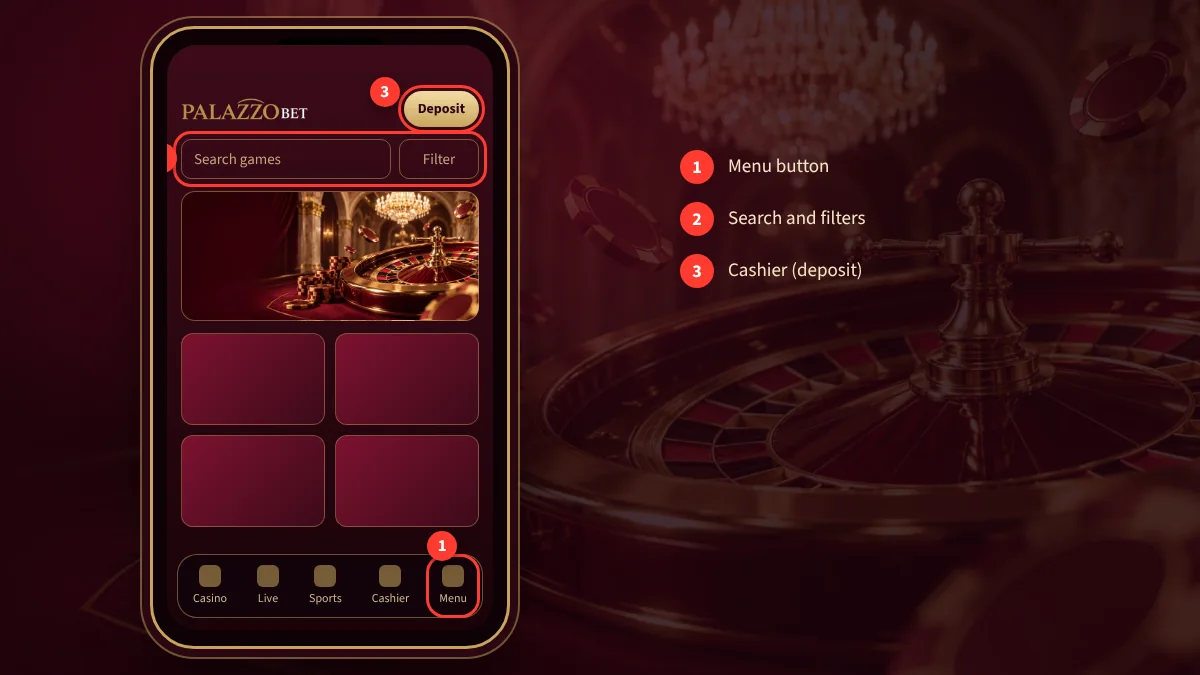
Logging in on a phone needs the same details as on a desktop. The download question often hides a simpler need, which is saved credentials, and the browser can remember a password if the phone is locked. That convenience should be switched off on shared devices. A filter button narrows games by provider or type, and the choice is kept for the session.
On iPhone, Safari is the recommended browser. The site opens as a touch-friendly layout rather than a shrunken desktop page. Live tables look better in landscape, while the cashier and account pages are comfortable in portrait. A larger text size in the browser settings helps on small screens, where long tables can otherwise feel cramped.
Fast Deposits from Your Phone
The cashier on mobile offers the same options as on desktop, and the list of methods can depend on the account. Before paying, check the amount, the method and any fee on screen. A wrong digit or a wrong network, particularly with crypto, cannot be reversed, so slow down on a phone, where thumbs hit the wrong key easily.
During payment the phone may jump to a banking app. When returning, the page may need a refresh; look at the transaction history before sending the same payment again, because a double deposit confuses the balance. More detail is on the payments page.
Avoid public Wi-Fi for payments and keep the screen lock on. Cards and wallets in another person’s name are commonly rejected, so the method should belong to the account holder. After each deposit, take a screenshot and confirm that the balance changed; this habit costs seconds and saves arguments later.
APK Safety and Permissions
An APK is the installation package of an Android app. Packages installed from outside a store are not reviewed, so they can carry malware. A file should therefore be taken only from the brand’s verified channel, never from search results, forums or chat messages. If the source cannot be verified, the correct decision is to skip the file and use the browser.
Permissions deserve a look too. A casino app has no reason to ask for contacts, messages or the camera. A package that requests more than it needs should not be installed, or should be removed if already installed. The setting that allows unknown sources should be turned off again once the work is finished, so later files cannot slip in.
A package signature and version number can be compared with what the provider publishes. If the phone slows down, shows odd ads or drains its battery after an install, remove the package, run a security scan and change passwords reused elsewhere.
Mobile Browser vs PWA App
There are three mobile routes: the browser, a PWA and an APK. The browser needs no setup and works on any device. A PWA is a shortcut that opens the same site full screen. An APK exists only on Android and should be considered only if its source is verified. The table compares the three.
| Method | Setup | Updates | Risk |
|---|---|---|---|
| Mobile browser | None | Automatic | Low |
| PWA (home screen) | A few taps | Automatic | Low |
| APK (Android) | File install | Manual | High if the source is not verified |
Choosing a route means balancing need, device and security. A palazzobet app download that promises extra features should be treated with caution; comparison sites that push one particular file are rarely neutral. The word palazzobet download in a search box brings real and fake results alike. The advantage of a PWA is that it does not depend on store approval, and a browser update updates the page with it.
The drawback is that notification support is limited on some devices. If notifications are needed, they can be enabled in the browser settings, but constant alerts can also push impulsive betting, so set a time and amount limit before turning them on.
Palazzobet Android Installation Steps
The safest Android route is a home-screen shortcut: open the verified address in Chrome and choose “Add to Home screen” in the menu. If a package file will be used, first verify its source, then allow unknown sources once. Any palazzobet apk download should come from the channel named in an official notice.
The steps below summarise the general installation flow for both Android and iPhone. The wording on your screen may differ, but the order stays the same.
- Open the current Palazzobet address in your phone browser.
- Go to the “Mobile App” section in the menu.
- On Android, download the APK and allow installation.
- On iPhone, use Safari “Share → Add to Home Screen”.
- Open the app, log in and allow notifications.
After installing, switch the unknown-sources setting off again and keep a security app updated. A palazzobet casino app that behaves oddly, asks for unexpected permissions or fails to start should be deleted at once. If the installation fails, remove the file and return to the browser method, which needs nothing from the phone beyond an up-to-date browser.
Palazzobet on iOS (iPhone) Guide
Package files cannot be installed on an iPhone, so the only safe route is a Safari shortcut. Open the verified address in Safari, tap “Share” and choose “Add to Home Screen”. The shortcut appears like any other app and opens full screen without the address bar.
Nothing needs updating; the page loads the current version on every open. Deleting the shortcut does not affect the account, and it can be added again. Pages that promise to install an app from outside the store on an iPhone can be designed to steal login details, so palazzobet ios users should treat them with suspicion.
Notifications may be limited for shortcuts on iOS. Where the setting exists, enable it under Notifications. If data saver mode is on, live stream quality drops automatically, and it returns when the phone joins Wi-Fi or the mode is switched off.
Mobile Data and Battery Use
Live casino streams and live sports feeds are the fastest way to burn mobile data. A player on a limited plan should lower stream quality or use Wi-Fi.
Battery drain depends on brightness, screen time and signal strength. In weak coverage the phone spends more energy to stay connected. For long sessions keep the phone charging, since a shutdown mid-round is frustrating. After login, closing unused tabs frees memory, which makes the palazzobet mobile experience smoother.
If the connection drops during a round, the server decides the result, and the history section shows it once you reconnect. This is why important bets should only be placed on a stable connection. Airplane mode, battery saver and background data restrictions can all break a session, so check those settings before an important action.
Mobile Troubleshooting
When a page will not open, check the internet connection first, then the address. The address may have changed, in which case only the one in the brand’s official announcement should be used. Clearing the browser cache and reopening the page fixes most display issues. Searching for another file to download is not a solution at this stage.
If login fails, use the password reset. If a live stream freezes, lower the quality or switch networks. If the cashier page does not load, the browser may be out of date, and updating is enough. If problems continue, write to live support with the phone model, browser version and the error message.
For account safety keep a screen lock on, think before saving passwords, and never tap links in suspicious messages. After changing phones or clearing browser data, the session ends and a new login is needed, so keep the username and password ready. Android and iPhone users alike can reset a forgotten password from the registered email or phone only.
Live Betting on Mobile
Live betting changes quickly, and an unstable connection hurts most here. Whether you use the browser, a shortcut or a package, make sure the odds on the slip are current before confirming. A palazzobet app download adds nothing to odds quality, and a palazzobet download of unknown origin only adds risk. A slow connection can delay confirmation and the price may move in the meantime.
Notifications help track the match and the slip, but they can also encourage impulsive stakes. Decide a time and loss limit before you start, and stop when it is reached. Cash-out offers depend on live odds and change from second to second, so they should not be treated as a guaranteed exit.
Even with a stream the screen is small, so slips and odds deserve a careful read. Rotating the phone to landscape often shows odds tables more clearly. If control over betting slips away, ask support to restrict the account.
FAQ
Is there a Palazzobet app?
An official Palazzobet app in a store is not confirmed. The platform runs in a phone browser and can be added to the home screen as a shortcut. Files described as palazzobet android packages circulate, but unverified ones are risky. Try the browser route first, and take any package only from the channel named in an official notice.
Where can I download the Palazzobet APK?
No direct download link is given here because files found through search are often unofficial. A package should come only from the verified channel in an official announcement, and a file whose source cannot be confirmed should not be installed. The safest option is the browser or home-screen shortcut.
How do I use Palazzobet on iPhone?
An APK cannot be installed on iPhone. Open the verified address in Safari, tap “Share”, then “Add to Home Screen”, and the shortcut opens full screen like an app. This needs no installation or updates. Palazzobet ios users should avoid pages that promise a non-store app and enter passwords only on the verified address.
Are all games available on mobile?
Casino, live casino and sport sections open on mobile, but some games may work only on desktop or in landscape because of provider limits. Old browsers may fail to open some live tables; updating the browser or rotating the phone usually fixes the problem.
How do I log in safely on my phone?
Check the address and padlock first, then type details only on the verified page. On shared phones switch off password saving, avoid public Wi-Fi for cashier actions and lock the screen. Never share the verification code with anyone, including people claiming to be support staff. The same applies to a palazzobet casino app.
How can I reduce data use?
Lower live stream quality, join Wi-Fi when possible and close unused tabs. The phone’s data saver mode can also reduce stream quality automatically.
The safest way to use Palazzobet on a phone is to open the verified address in the browser or add a shortcut to the home screen. A package file from a random source is rarely official, so skip it unless the channel is confirmed. On iPhone there is no other option anyway.
See the login page for sign-in steps and the payments page for cashier help. Gambling can be addictive, and GambleAware offers free support.